Appointments & the Waiting-Room Queue
The headline of the quarter. Clients book a time, your team runs the day from one live board, and the line out the door gets shorter.
Appointment Scheduling & Live Board
Set up the kinds of visits you offer, then run distribution day from a board that updates on every screen as people arrive.
- Your Own Visit Types: Shopping visits, order pickups, deliveries and intake interviews each get their own length, how many can run at once, and how far ahead people can book.
- Hours and Holidays: Set your open hours once and block off the days you are closed.
- One Board for the Day: Check clients in, call the next person, mark a no-show, reschedule or cancel. Checking someone in gets their cart ready.
- Walk-Ins Welcome: Add a walk-in straight from the board. They join the same queue as everyone else.
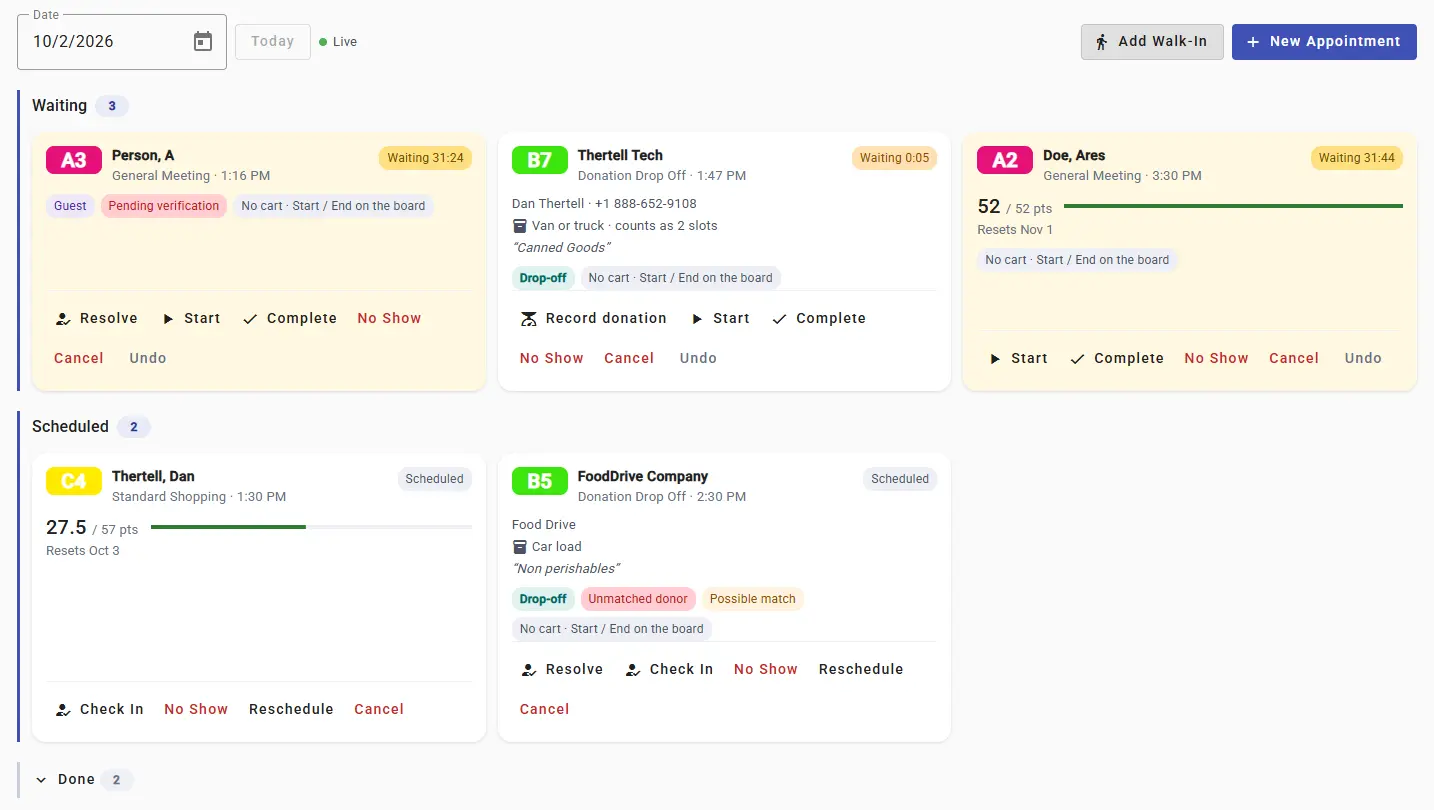
The appointments board shows who is waiting, who is booked next and any donation drop-offs on the way.
Appointments are switched on per food bank. Contact us and we will turn it on and help you set up your first visit types.
Online Booking for Clients and Guests
Clients can book their own time from the online ordering site. People who do not have an account yet can book as a guest with just an email address.
- Share the Link: Your booking page comes with a QR code and a printable poster for the front door.
- Reminders by Email: Clients get a confirmation and reminders you can edit. The email includes a link to change or cancel.
- Match Guests Later: When a guest shows up, a volunteer can link the booking to the right family in a couple of taps.
Waiting-Room Queue on Your TV
A new slide for your waiting-room TV shows the queue with estimated waits. Each client gets a short code for the day, like A12, so nobody's name ever appears on screen.
The queue slide needs the latest version of the Foodbank Helper TV app.
Donation Drop-Off Bookings
Donors can now book a drop-off time the same way clients book a visit, so your receiving volunteers know what is coming and when.
- Sizes That Fit Your Dock: Offer sizes like a few bags, a carload or a pallet. A pallet can take a longer slot and count for more of your capacity.
- Record It on the Spot: The drop-off card has a Record donation button that opens the donation form with the donor already filled in.
- Donor Emails: Donors get their own confirmation and reminder emails, including any drop-off instructions you write.
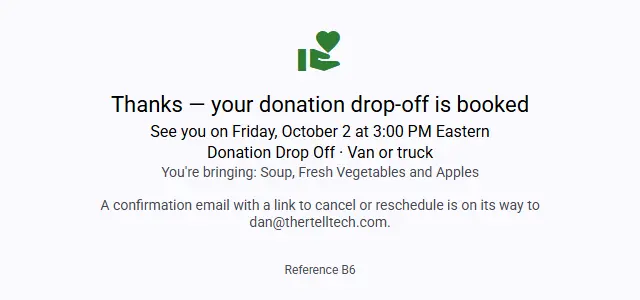
What a donor sees after booking a drop-off time.
Points and Tags on Appointments
When you book an appointment for a family, you now see their points balance, their next reset date and their tags. If the family will have no points on the day, a warning lets you pick a better date before they make the trip. The warning never stops you from booking.
Donations & Donation Records
Thanking donors used to be a job for someone with a spreadsheet and a free afternoon. Now it mostly happens by itself.
Donor & Donation Type Management
A new Manage Donations page lets you edit and tidy up your donors and donation types. Donors can now have an email, a contact name, a phone number and a mailing address. Archive the ones you no longer use and your history stays intact.
Automatic Donation Records
Foodbank Helper can now email donors a record of what they gave, with a PDF attached.
- Daily or Monthly: Choose how often each donor hears from you. Regular donors get one tidy summary and not an email for every bag.
- Pounds or Kilograms: Set a default for your food bank and change it for any donor who prefers the other.
- Easy to Stop: Every email has a one-click unsubscribe.
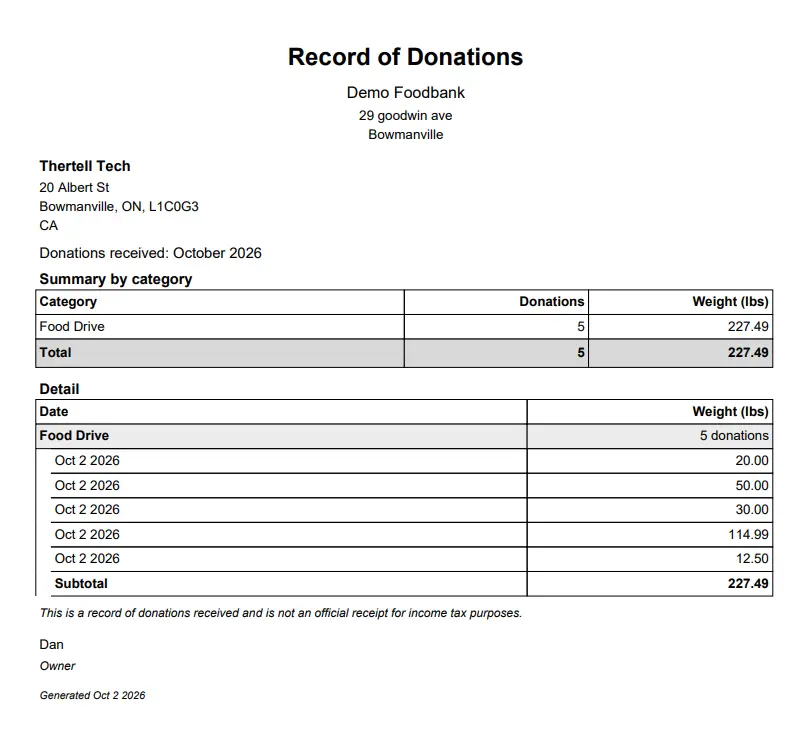
Each donation record summarizes what was given by category, then lists the detail.
Donation records confirm what was donated. They are not tax receipts.
PDF Donation Records in Bulk
Need donation records for year end? Create a PDF for one donor over any date range, or for every donor at once. You can download them or have them emailed to you, and you can send them on demand to any donors you tick.
Families & Members
Cleaner client records, and safe ways to fix them when real life changes.
Duplicate Family Detection & Merge
Foodbank Helper now spots families that look like the same household entered twice and tells you why it thinks so.
- Duplicates Tab: Compare two families side by side, then choose Merge or Not a match.
- A Heads-Up While You Type: Saving a family that looks like an existing one shows a warning. It never blocks you.
- Preview Before You Merge: Pick which family to keep and see exactly which members and orders will move.
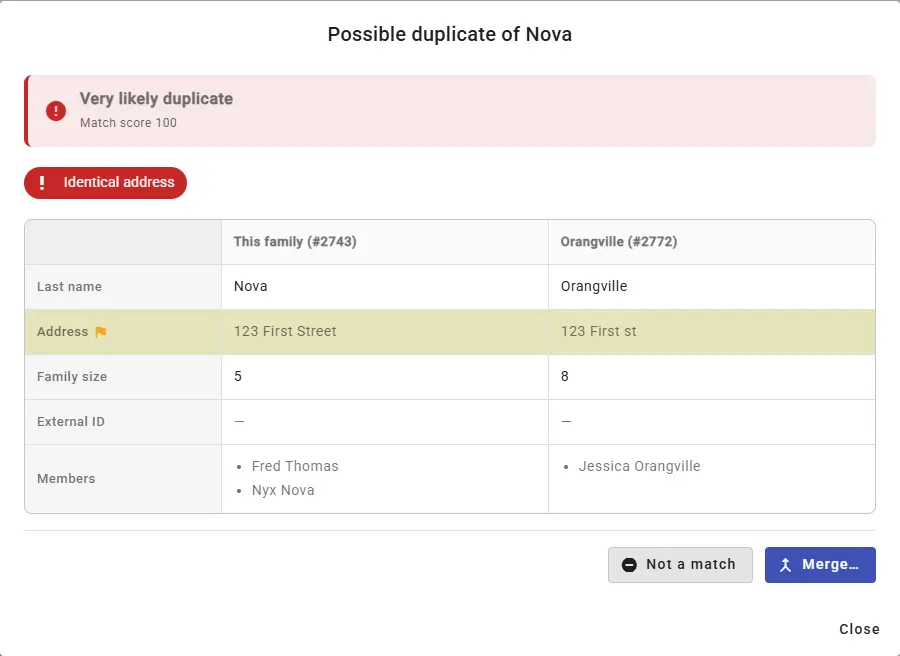
Compare two possible duplicates side by side before deciding what to do.
Move, Split & Merge
Households change. A teenager moves out, two families combine, someone was added to the wrong household.
- Move a Member: Into another family or a brand new one. Their past orders can go with them or stay.
- Remove Without Losing History: Take someone out of a family and keep their past orders for your reports.
- Undo: Deleted families and members can be restored.
Family Tags
Create your own coloured tags, like "Delivery" or "Diaper program", and they follow the family onto the cart screen where your volunteers will see them. Tags can be added by hand or by a simple rule, such as any family with an infant.
Different Last Names in One Household
A member can now have their own last name. Leave it blank and they use the family name as before.
Carts, Checkout & Packing
Fewer mix-ups on a busy day, and an undo for the ones that still happen.
Checkout Review
A new Review button shows the family, points used, weight and items before you check out. It only pops up by itself when something looks off, like a cart that is over a limit or has been sitting for half an hour. A normal cart checks out exactly as before.
Protection for Carts in Use
If another volunteer scanned into a cart in the last five minutes, the cart list shows their name on it. Try to check out or delete that cart and you will be asked to confirm first. If your cart is checked out from under you anyway, your tablet chimes and offers to carry on in a new cart with the items that were missed.
Restore Deleted Carts
Deleted the wrong cart? Tap Undo right away, or open the new Deleted Carts screen and bring it back with every item still in it. Carts can be restored for up to 24 hours after they were created.
Item Limits That Scale with the Household
A family of six and a single adult should not have the same limit on milk. You can now write a limit rule once and attach it to any item or item group.
- Rules in Plain Terms: One per child, a step up for every two people, a cap at the top. A preview shows what each family size would get.
- Shown in the Cart: Volunteers see the number that applies to the family in front of them. Limits still warn and never block.
These rules work for in-person carts today. Support for online orders is coming soon.
Redesigned Packing Screen
Packing online orders is now built for a tablet or a phone in one hand.
- Count as You Pack: Each item shows what was asked for next to a plus and minus counter, with a progress bar for the whole order.
- Add Extras: Scan or pick an item to add something the client did not order.
- Honest Numbers: Weight, inventory and reports now reflect what went in the box, not what was requested.
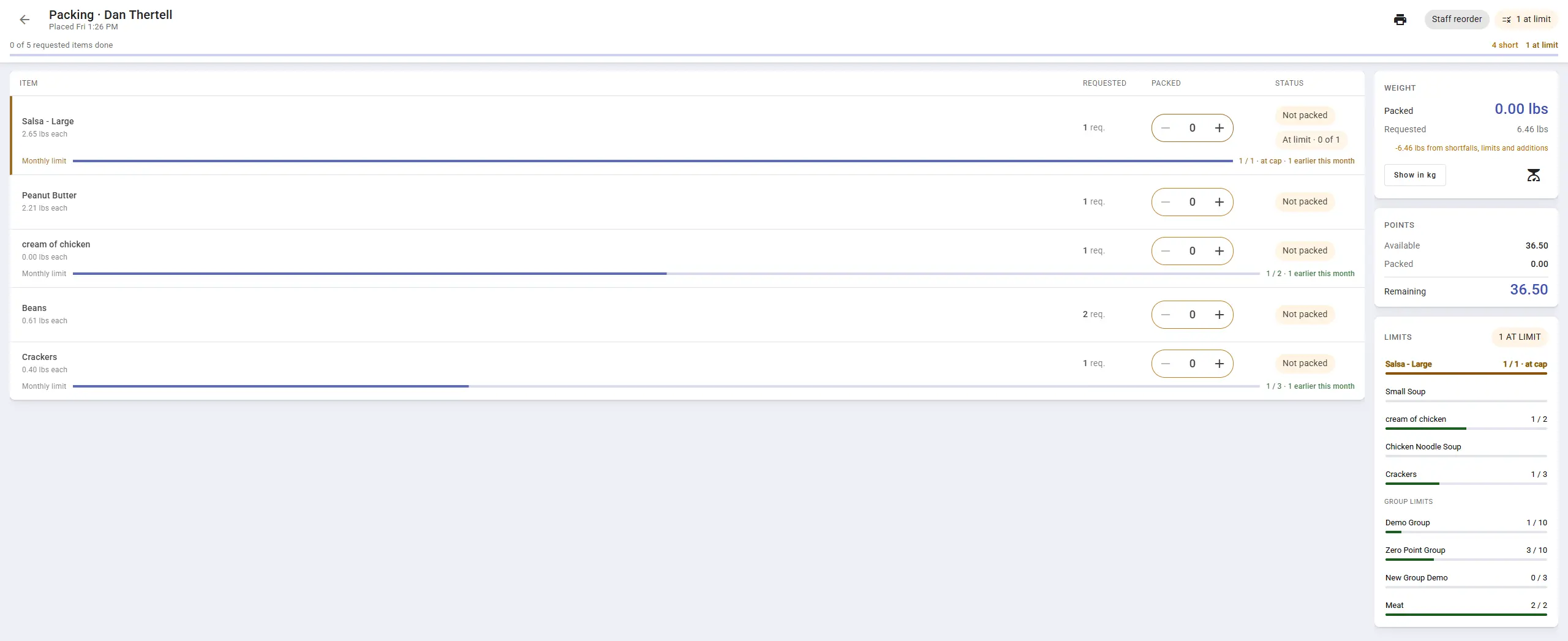
Each item shows what was requested next to a counter for what went in the box.
Volunteers & Shifts
Changing the schedule should not mean a round of apology emails.
Safer Shift Editing & Deleting
Editing or deleting a repeating shift now asks whether you mean just this one or this and every following shift, and shows you who is affected before anything changes.
- Move, Don't Cancel: Shift signed-up volunteers to another shift in the same step.
- One Email Each: Affected volunteers get a single summary and not a separate email for every week.
- Restore for 90 Days: A deleted shift comes back with its volunteers still on it.
Volunteers Without an Account
Not every volunteer wants an account. You can now add a volunteer by name only, put them on shifts and track their hours yourself. If they create an account later, you can link the two and their hours carry over.
Getting Around & Admin
Easier for a new volunteer to learn, and easier for you to set up who can do what.
Guided Tours & Practice Mode
There is a new help button at the top of every screen. It offers short guided tours for the page you are on, most of them two to four minutes long.
- Practice on Made-Up Data: Tours run on pretend families and carts. Nothing is real and nothing gets saved.
- What's Covered: Carts, families and members, packing, shifts, donations and slideshows.
- Follows the Volunteer: Progress is saved to their account, so it works on shared tablets.
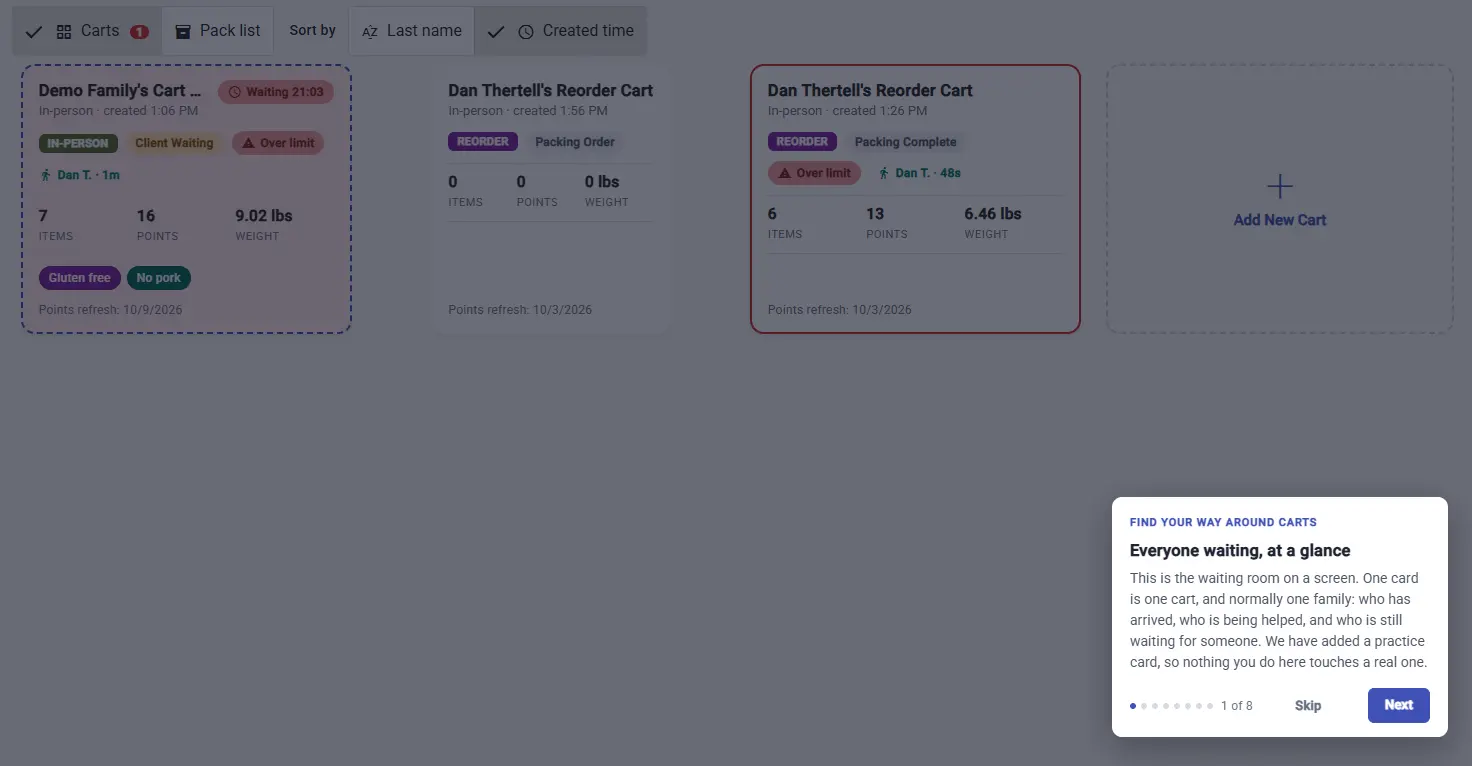
A tour explains the screen one step at a time, using a practice cart.
New Menu with Pinned Pages
The menu is much shorter. A new All pages screen shows everything you have access to as tiles with a one-line description, grouped by the kind of work and searchable. Pin the pages you use most and they follow you to any tablet you log in on.
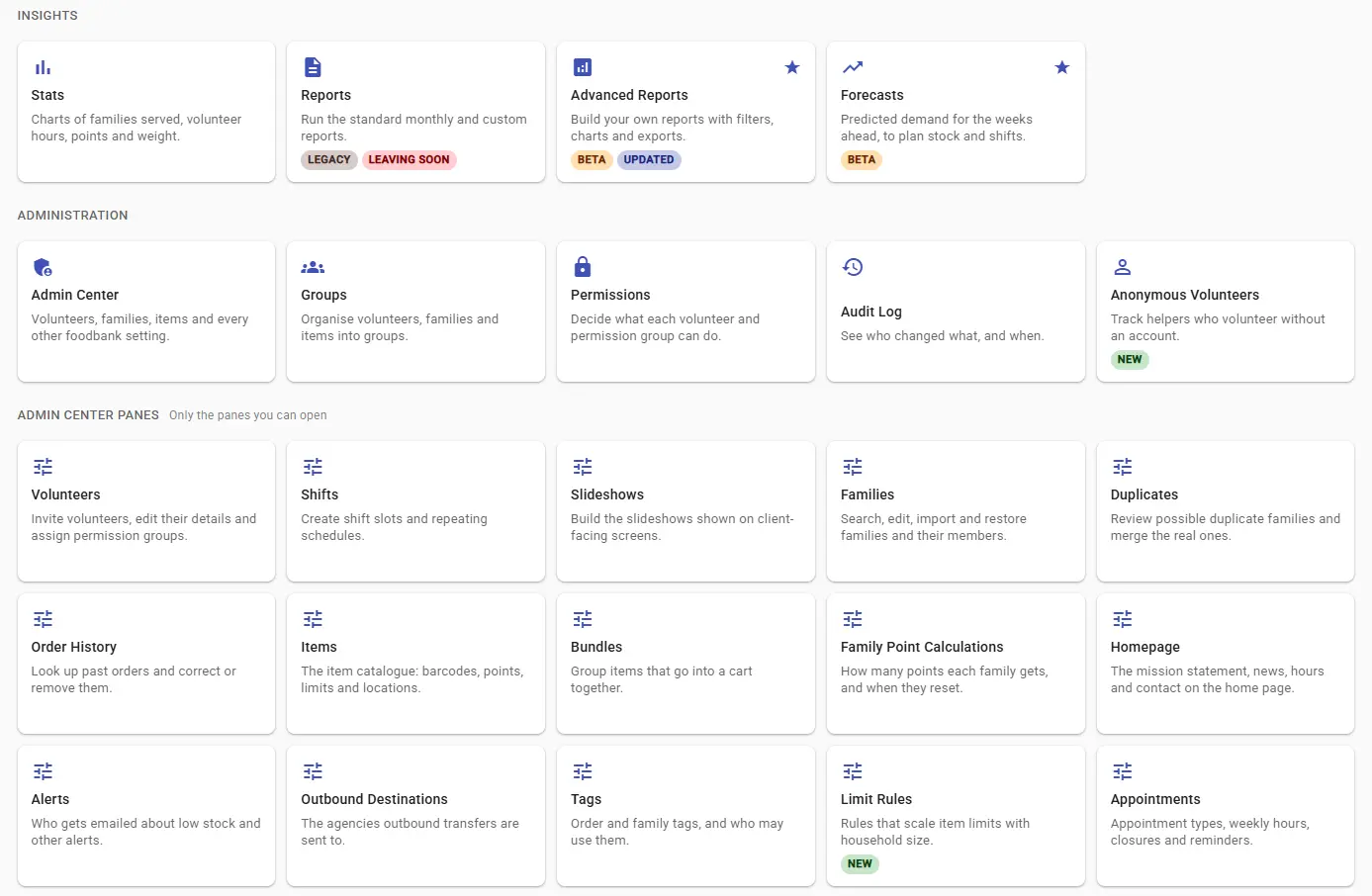
Every page is a tile with a short description. Starred tiles are pinned.
Permission Categories & Role Templates
Permissions are now grouped into categories you can set in one go: no access, read only, or read and write. There are also five ready-made roles to start from, including Shopper, Front Desk and Inventory Management. Nobody's existing permissions were changed.
Audit Log Viewer
Admins can now look up who did what and when. Filter by volunteer, action and date, and export the results to a spreadsheet.
Reports & Forecasts
Less time building reports, and a first look at what next week might bring.
Standard Reports, Including HungerCount
Advanced Reports has a new Standard Reports tab with seven reports that are ready to run. Add one to your own reports and you can edit it or put it on a schedule.
- HungerCount: Individuals by age group, new clients, visits and households, laid out the way the Food Banks Canada survey asks for them.
- Also Included: Monthly operations summary, shopping and wait times, donations and donors, inventory and food flow, and volunteers.
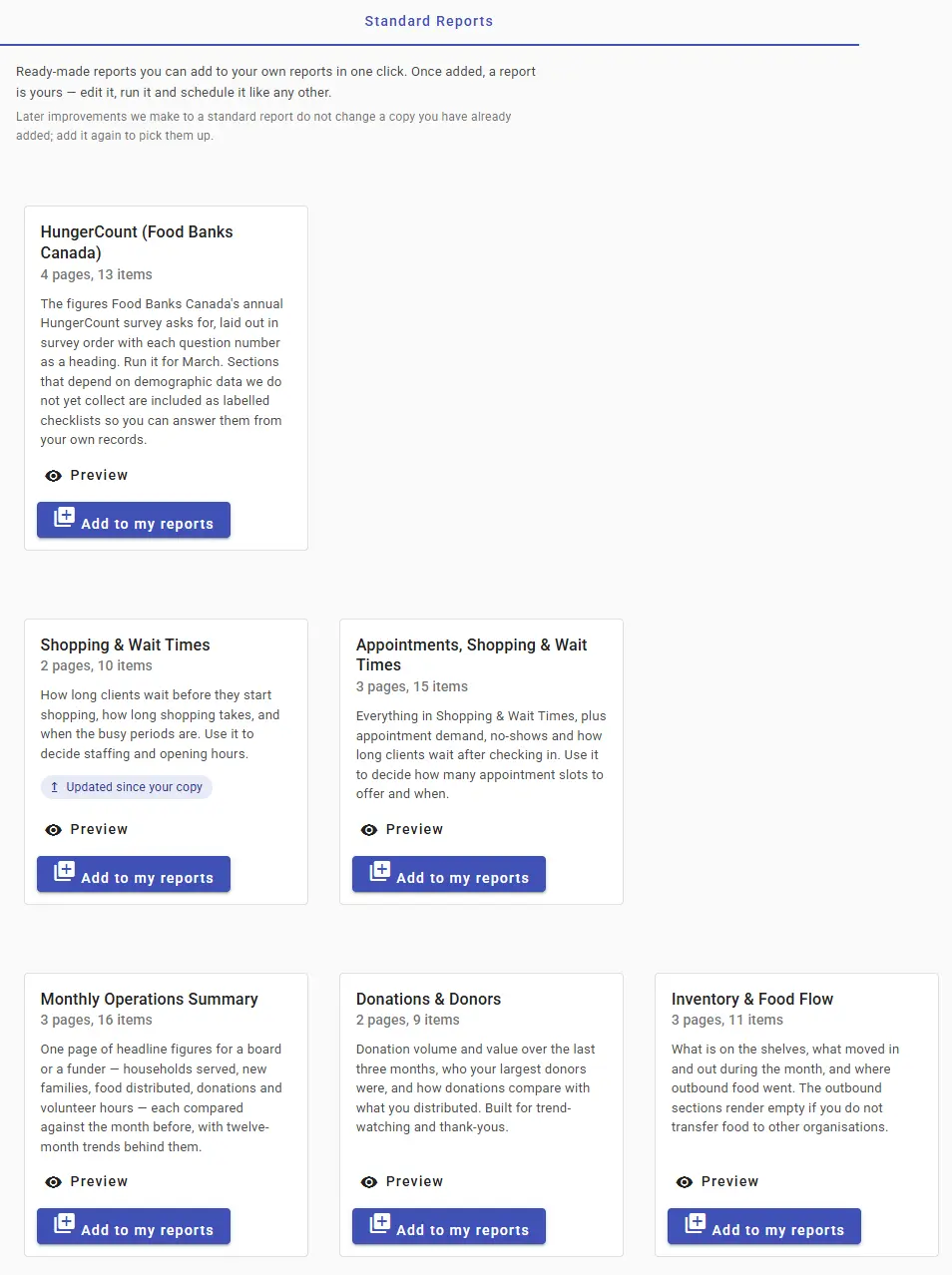
Ready-made reports, each one a starting point you can make your own.
HungerCount does not accept figures from other systems, so you still copy the numbers into the survey yourself. Age groups rely on members having a date of birth on file.
Wait-Time & Shopping-Time Reports
Last quarter we added live wait timers to the cart dashboard. Now that history is in Advanced Reports, with charts for wait and shopping time over the months, your busiest hours and days, and the share of clients served in under 15 minutes.
Heatmaps in Advanced Reports
Some patterns are easier to see as colour than as a column of numbers. Advanced Reports now has heatmaps you can drop into any report.
- Busy Times: Which hours of which days are packed, and which are quiet enough to move a volunteer.
- Waits and No-Shows: Where the long waits happen, and which appointment times people tend to miss.
- Visits Calendar: A whole year of visits on one page, plus heatmaps for item groups and household size.
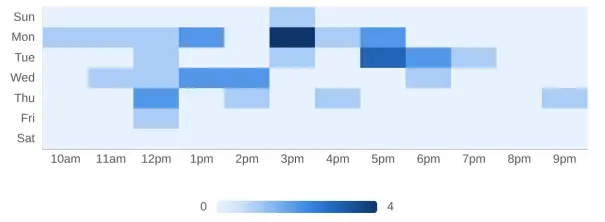
Darker squares are busier. Days run down the side and hours along the bottom.
Family Visit & Donation Forecasts
A new forecast card shows how many families to expect each day for the next two weeks, and how much donated food is likely to come in. It learns from your own history and refreshes every night.
Forecasts need some history before they are useful, so we turn them on one food bank at a time. Let us know if you would like to be next.
PowerPoint Slideshows
Upload a PowerPoint file and it becomes a TV slideshow, usually in under a minute. You can also copy a slideshow or move slides between them.
One Low-Stock Email a Day
Low-stock alerts can now arrive as a single daily summary at a time you choose. Turn it on under Alerts in the Admin Center.
Faster Scale Readings
Weights from connected scales now show up right away.
Inventory Warnings Don't Block
Moving more stock than the system thinks you have now asks you to confirm. It no longer stops you.
Referral Program
Most food banks hear about us from another food bank. Now there is a thank-you for that.
Refer a Food Bank, You Both Get $100
Every food bank now has a referral code and a link it can share. When another food bank signs up with yours, you each get a $100 credit.
- Find Your Code: It is in your food bank settings, under Referral Program.
- Share It Your Way: Pass along the code, or send the link and it fills the code in for them.
- See How It's Going: The same page shows which referrals are pending and which have signed up.
Want help turning these on?
All Q3 2026 features are available to every Foodbank Helper account at no extra cost. A couple of the bigger ones, like appointments and forecasts, are switched on per food bank. Contact our support team and we will get you set up.