The Inventory Management Overhaul
The biggest investment of the quarter: real operational visibility into stock, a proper paper trail for food leaving the building, and tracking that matches how food actually arrives.
Inventory Dashboard & Low-Stock Alerts
A dedicated inventory dashboard gives you an at-a-glance view of stock health, so you can spot problems without scrolling the full item list.
- KPI Summary Cards: Total items tracked, items at zero stock, and items expiring within 7 and 30 days, all on one screen.
- Low Stock Table: Any item that falls below the per-item reorder threshold you set is flagged automatically.
- Expiring Items Panel: Highlights what needs to move soon, color-coded by urgency.
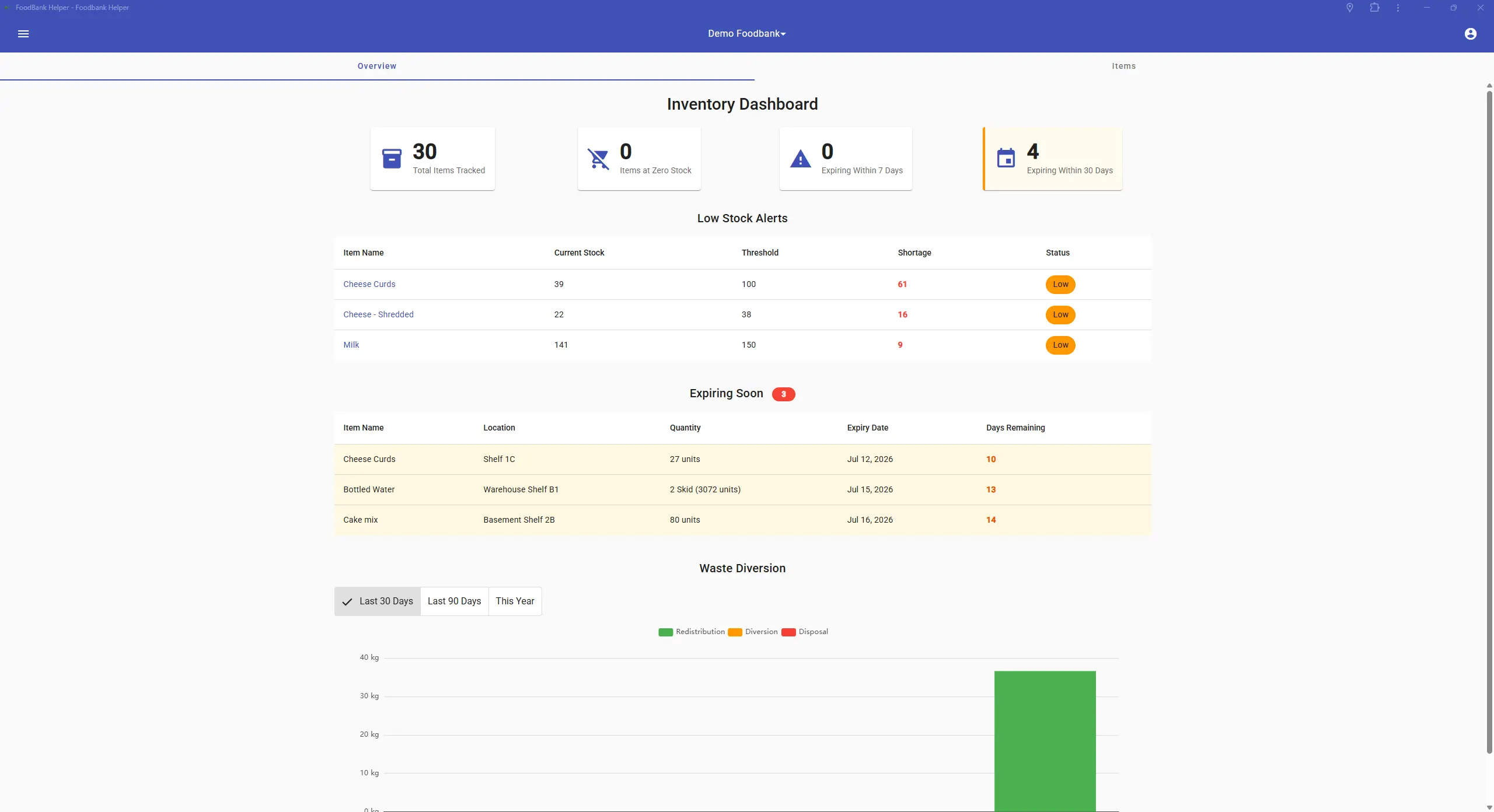
The Inventory Dashboard brings stock health, low-stock alerts, and color-coded expiring items together in one view.
Outbound Transfers & Waste Diversion
When food leaves inventory outside of a normal client visit, staff can now record exactly where it went, which makes grant reporting on waste reduction and food redistribution much easier and more accurate.
- Redistribution: Satellite pantries, partner agencies, and other organizations you share surplus with.
- Diversion: Farms, composting, and animal feed.
- Disposal: Spoilage and shrinkage. Every reduction is automatically categorized for reporting.
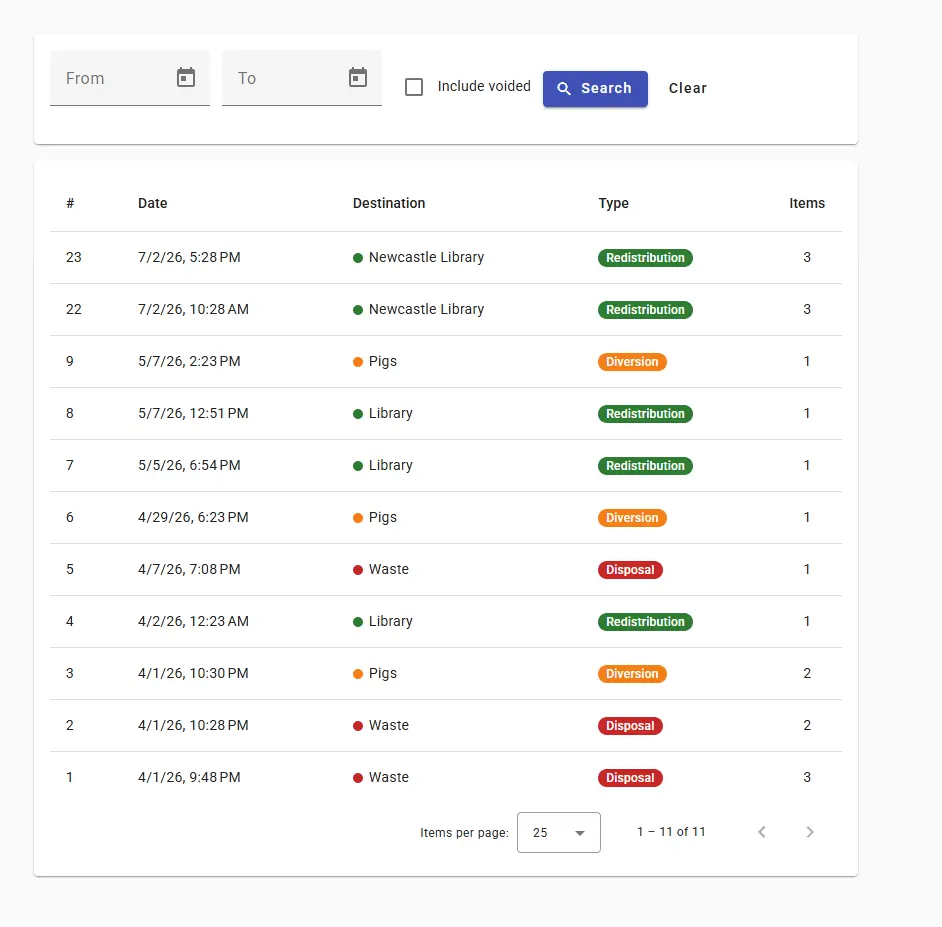
Tag each named destination as Redistribution, Diversion, or Disposal to keep grant reporting simple.
Packaging-Unit Inventory Tracking
Inventory can now be received, moved, and distributed in the packaging units food actually comes in (a skid, box, or case) instead of only individual units.
- Define Units Per Item: Admins set up packaging units and a default receiving unit, and on-hand figures display in the unit you choose.
- Package-Level Tracking Mode: An opt-in mode keeps count of intact packages, with a guided step-by-step wizard to switch modes and do an initial count.
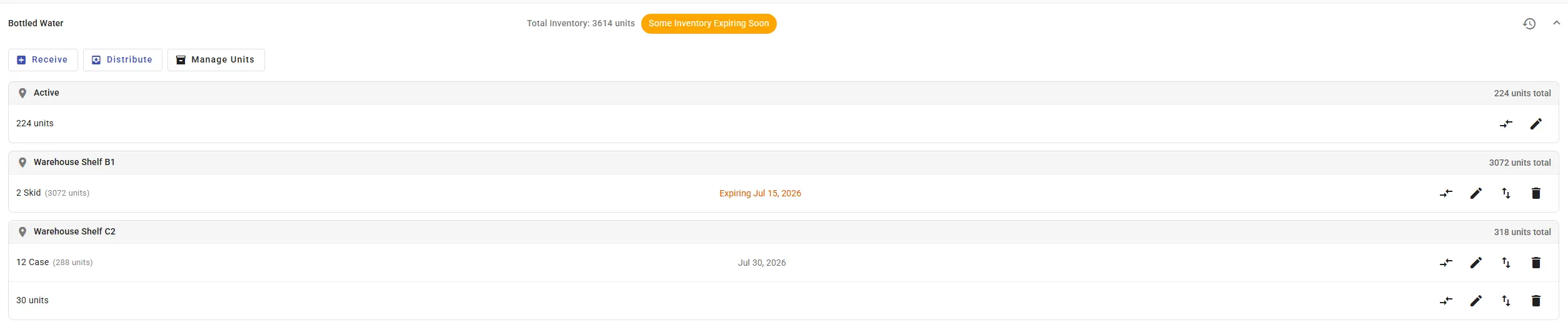
See on-hand stock per location in the units it actually arrives in: skids, cases, and individual units.
Simpler operations can ignore this entirely. The default behavior is unchanged unless you turn package-level tracking on.
Unit Conversion & Repacking
When you're using package-level tracking, you can seamlessly convert inventory between units as it moves through your building.
- Break Down: Split a skid into cases, or a case into individual units, when stock is opened for distribution.
- Pack Up: Combine a bunch of loose boxes back up into a skid to keep your counts tidy and accurate.
Automated Alerts & Notifications
The right people get the right heads-up automatically, so no one has to remember to check a dashboard.
Platform-Wide Alert System
A brand-new alert system emails the right people automatically. Alerts can target an individual volunteer, a volunteer group, or everyone at the food bank, and every future alert type now plugs into this same system.
- Out of the Box: Low stock, items expiring soon, unfilled shifts (including a consolidated digest), and shift sign-up/cancellation notices to admins.
- Personal Preferences: Volunteers manage their own notification preferences, and admins control the full alert catalog.
- In-App Alerts: Users who have installed the Progressive Web App (PWA) can receive alerts right in the app, not just by email.
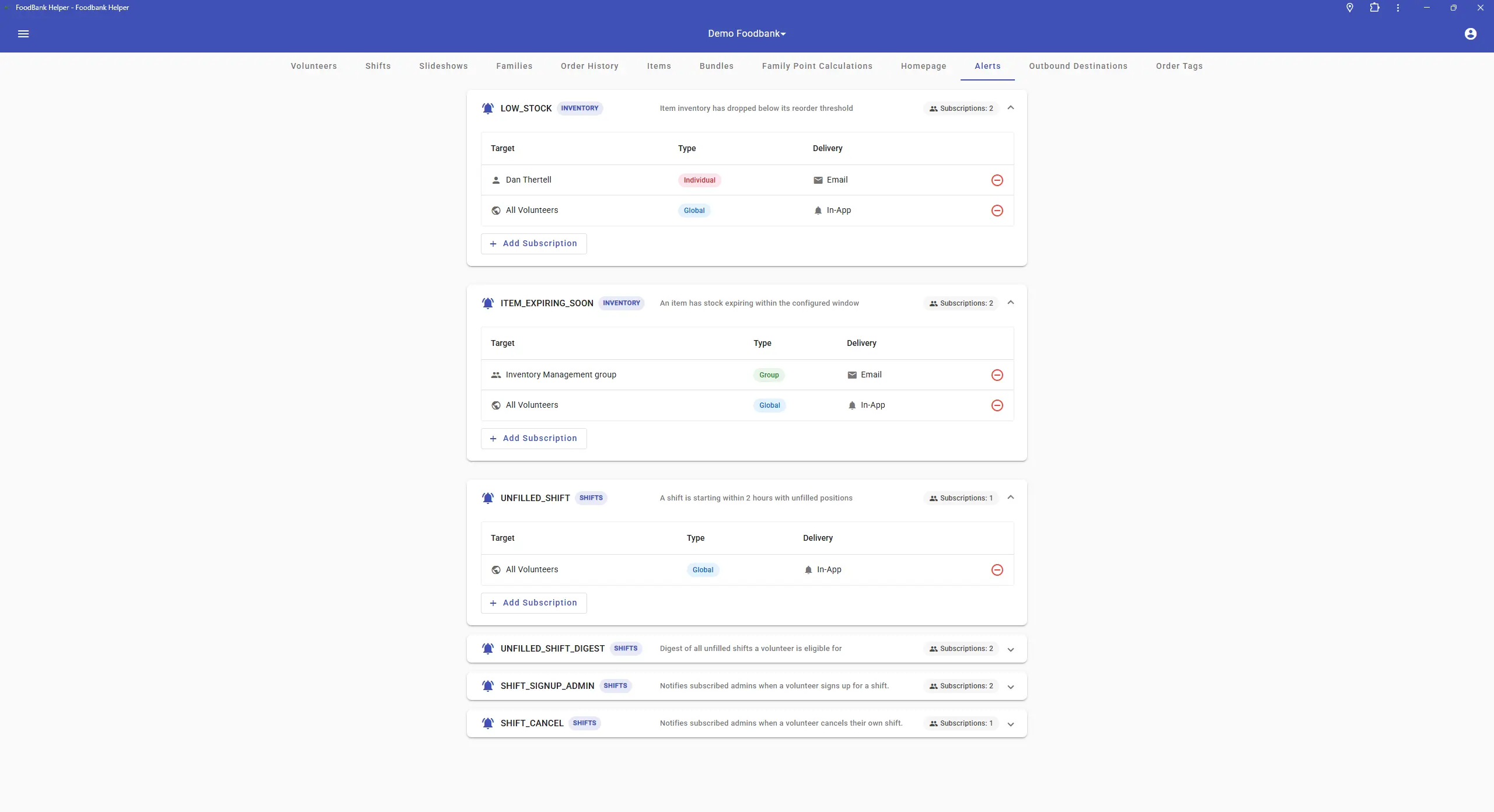
Each person subscribes to exactly the alerts they need, by email or in-app.
Smoother Carts & Checkout
Direct impact on daily distribution: spot bottlenecks fast and keep outgoing weights accurate.
Client Wait-Time Tracking & Cart Dashboard
The cart dashboard now shows how long each in-person client has been waiting, so volunteers can immediately see who's been waiting too long.
- Live Count-Up Timer: A cart enters a "Client Waiting" state the moment it's created, then switches to "Client Shopping" the instant the first item is added, freezing the final wait time.
- Color-Coded Tiles: Tiles turn yellow at 5 minutes and red at 15 minutes so long waits are impossible to miss.
- Sort & Group: Sort the dashboard by wait time or last name, and optionally group carts by status.

Live wait timers turn tiles yellow at 5 minutes and red at 15.
Manual Cart Weight Override
For situations where the automatic weight calculation isn't right, authorized staff can manually set a cart's total weight, entered in pounds or kilograms or captured directly from a connected scale. Every outgoing-weight report honors the override for that order.
This is an opt-in, permission-gated feature that stays out of the way until you enable it.
Flexible Points & Eligibility
More control over how you allocate resources, and nothing changes unless you turn it on.
Tiered, Per-Person Point Calculation
A new tiered points engine lets you award points based on each person's position within the household. For example, the first adult can be worth more than the third.
- Fully Configurable: Set tiers per month and per category, opt-in per food bank.
- Clear Breakdown: The family view shows exactly how each household's points were calculated.
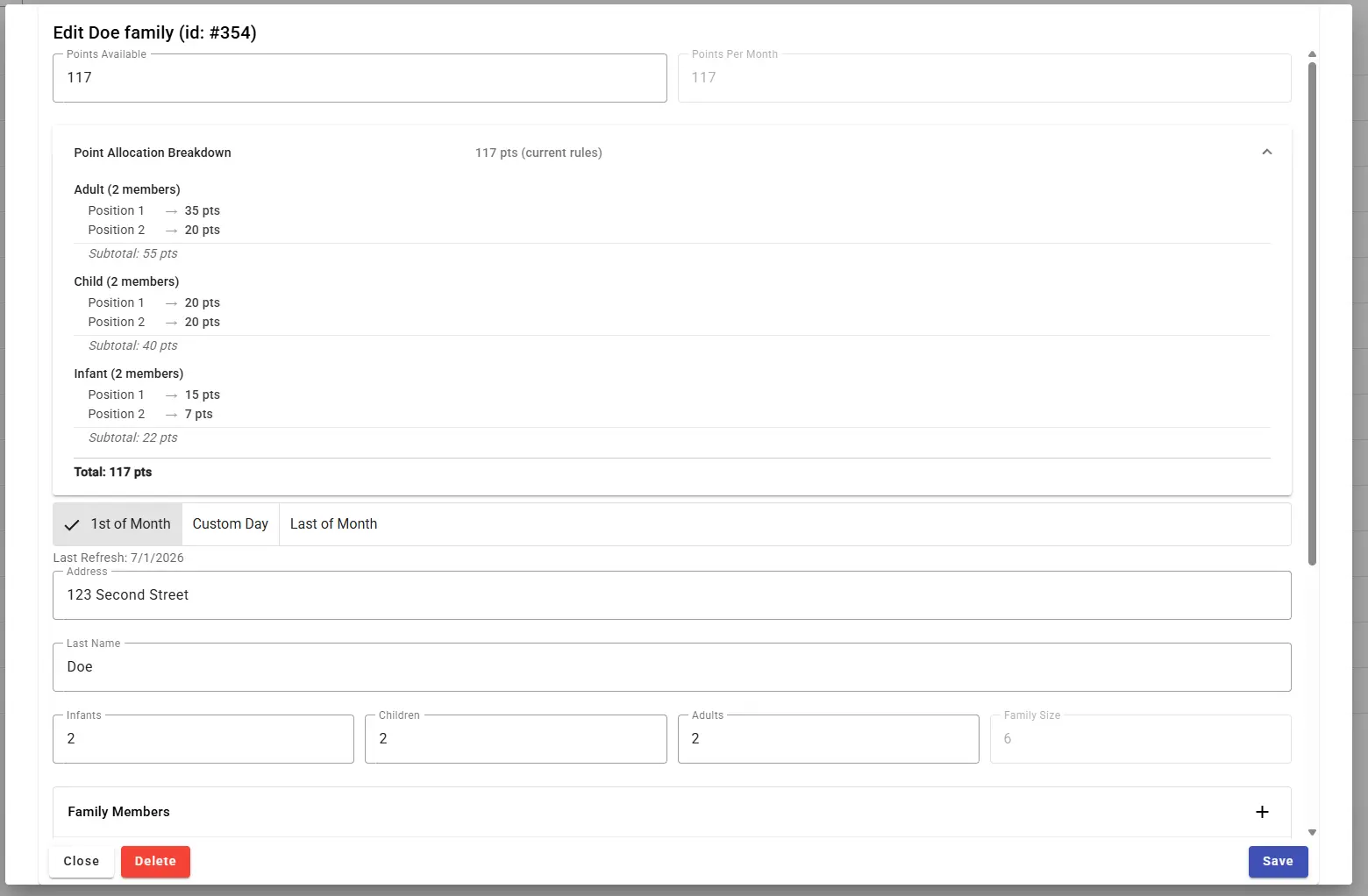
The family view shows exactly how each household's points add up, person by person.
Age-Based Points from Date of Birth
Record each member's date of birth and define age groups by minimum age. The system does the rest, making point allocation more accurate and far less manual.
- Automatic Assignment: Every member is placed in the right age group, and household adult/child/infant counts stay in sync.
- Recalculates on Birthdays: Points update automatically when a birthday moves someone into a new group.
- Built-In Safety Check: Turning it on runs a check to make sure member records are complete first.
Order Tracking & Accurate Reporting
Organize orders your way, and trust the numbers behind your reports.
Dynamic Order Tagging
Label orders with custom, color-coded tags from the order history. It's a flexible way to organize, categorize, and find orders.
- Fixed or Dynamic: Use a fixed value (like "Processed" or "Picked Up") or pull a value automatically from the family, shopper, or order (last name, external ID, family size).
- Manual or Rule-Based: Apply tags by hand or automatically with simple rules.
- Powerful Filtering: Filter order history by "has tag" or "does not have tag."
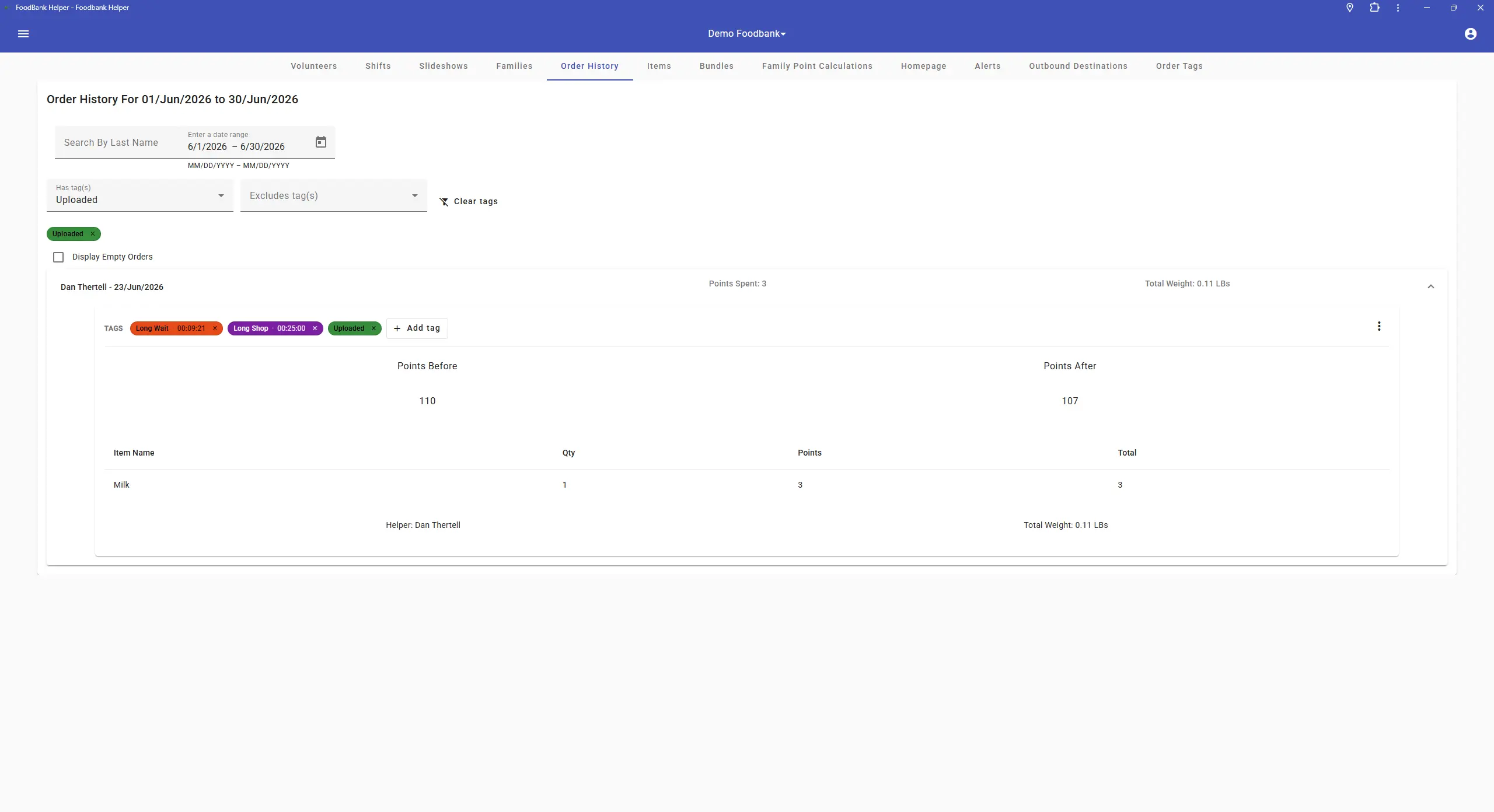
Colorful, dynamic tags can be applied by hand or by rule, then used to filter order history.
More Accurate Advanced Reports
A focused correctness pass on the Advanced Reports engine fixed several places where numbers could be misleading. The result is reporting figures you can trust.
- Accurate Client Counts: Automated monthly point-resets are no longer miscounted as real client visits, which had inflated "clients served," "new families," and household counts.
- Consistent Dates: Date ranges are now consistently inclusive, and deleted families are properly excluded.
Configurable Meals-Equivalent Stat
Set your own pounds/kg-per-meal conversion factor so the "Meals Equivalent" figure on the Weight Stats page reflects your own methodology, with an explanatory tooltip right on the stat card.
Easier Onboarding & Data Import
Bring your existing data in during onboarding, and cross-reference it with the other tools you already use.
Bulk Import Tool
A guided import wizard lets a food bank bring its existing data in without reformatting it first.
- Map Your Own Columns: Upload a CSV or JSON file and map your headers to our fields with simple dropdowns.
- Live Progress + PDF Report: Watch families, members, and items import in real time, then download a PDF summarizing exactly what came in.
- Configurable Duplicates: Choose to skip or update duplicates. Item imports support names, point values, inventory, barcodes, limits, and weights.
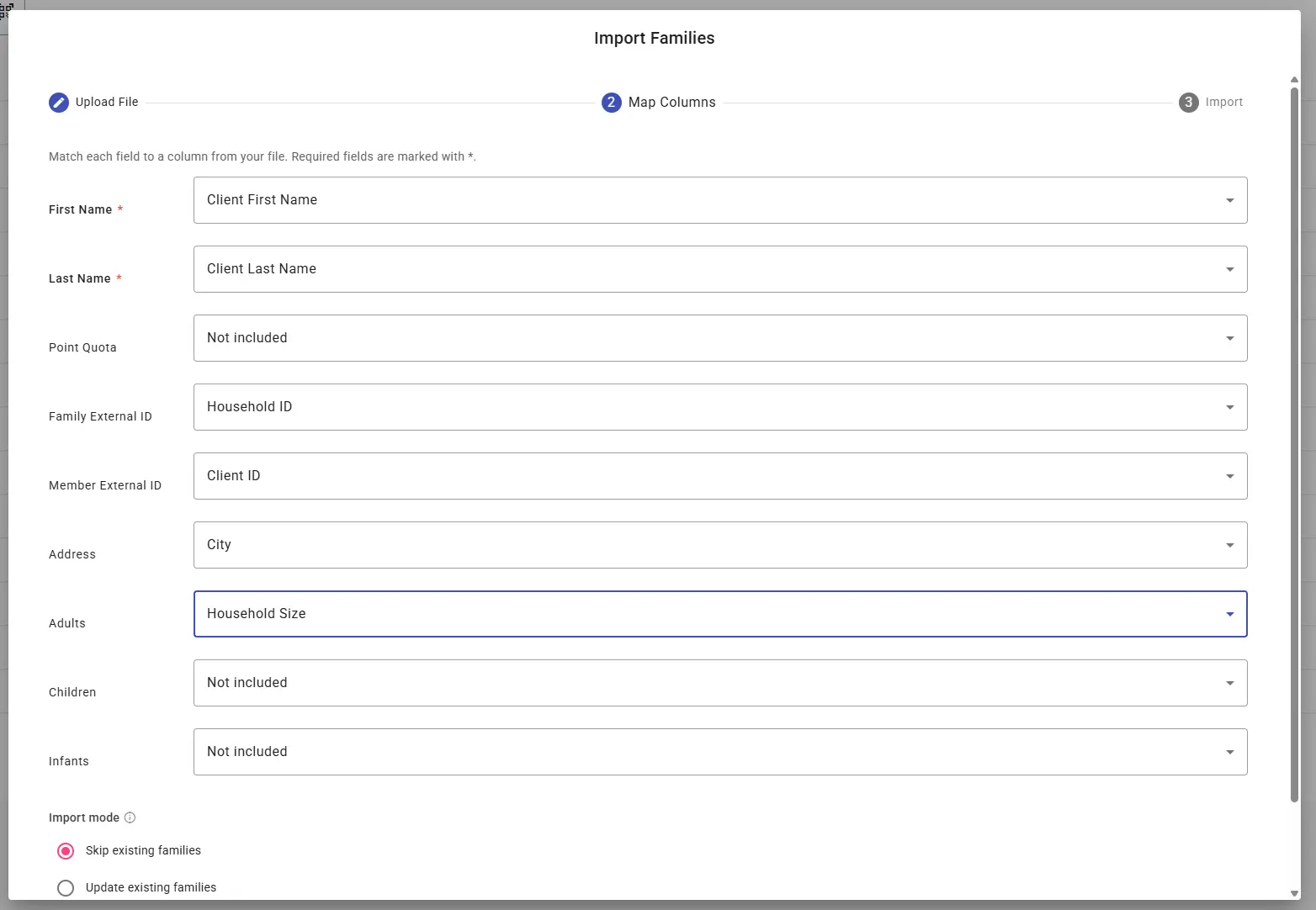
Map your own CSV or JSON columns to our fields with simple dropdowns.
External IDs for Families & Members
Families and members can now carry an optional external ID, such as a Link2Feed ID or any ID from another system your organization uses.
- Fast Cart Creation: Type or scan a member's ID to create a cart instantly.
- Lookup & Search: Find families by external ID in the admin center, and cleanly cross-reference between Foodbank Helper and other tools.
Volunteer Experience & Scheduling
Quality-of-life upgrades that recognize volunteers and remove a common scheduling headache.
Personal Volunteer Impact Dashboard
The volunteer homepage now shows personal KPI cards so volunteers can see the direct impact of their time. It's a simple, motivating way to recognize their contribution.
- Hours & Shifts: Hours volunteered and shifts completed, both this month and this year.
- Lifetime Impact: A running total of lifetime hours contributed.
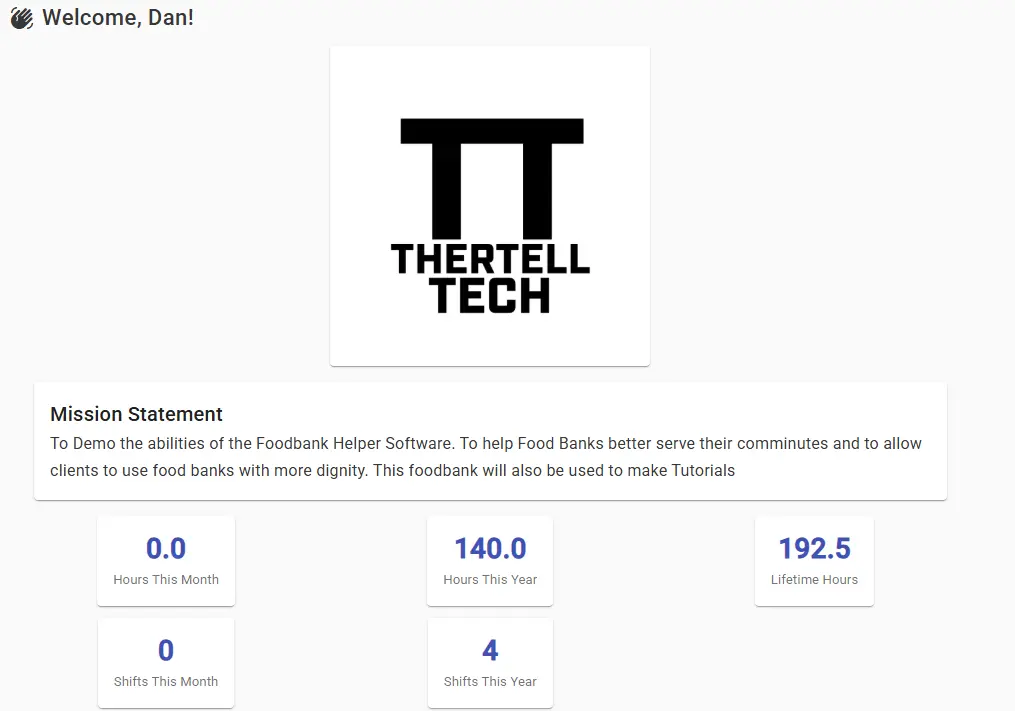
Monthly, yearly, and lifetime hours, front and center on the volunteer homepage.
No More Double-Booked Shifts
The system now prevents volunteers from signing up for shifts that overlap in time, with a clear message pointing to the conflicting shift. Back-to-back shifts are still allowed; only genuine overlaps are blocked.
Barcode Label Printing
Print exactly the barcodes you need, on exactly the paper you have.
Custom Barcode Selection
Instead of printing every barcode at once, staff can now choose exactly what to print: specific items, specific bundles, or whole item groups.
- Optional Sub-Label: Include a "Points / Limit" sub-label on each barcode when you need it.
- Still One Click: The "Download All" option is still there whenever you want everything at once.
Configurable Barcode Sizes & Paper
Barcode sheets are no longer locked to one size. Pick a size preset and a paper format, and the layout is calculated automatically.
- Size Presets: Compact, standard, or large.
- Paper Formats: A4, Letter, and A5, plus a dedicated 4×3 label option that prints one barcode per label for label printers.
Need a hand turning these on?
All Q2 2026 features are live and available to every Foodbank Helper account at no extra cost. Some of the new features, like tiered points, package-level tracking, and manual weight overrides, are opt-in. Contact our support team and we'll help you enable them.