Inventory & Intake Overhaul
Back-of-house operations got the biggest expansion in Foodbank Helper's history: scanning, auditing, waste tracking, and more.
Pre-Packaged Item Bundles
Admins can now define a "bundle", a named collection of items that always go together, and assign it a barcode. Scan that barcode at the checkout station and every item in the bundle is instantly added to the client's cart in one scan.
- Fast Checkout: One barcode scan populates the entire bundle. Requires the new Cart V2 interface.
- Perfect For: Holiday hampers, baby boxes, diabetic packs, or any standard package your organization regularly puts together.
- Live Point Math: As you build a bundle in the admin panel, the total point value updates in real time before you save.
- Full CRUD: Create, edit, and delete bundles at any time through the new Bundle Manager in the admin panel.
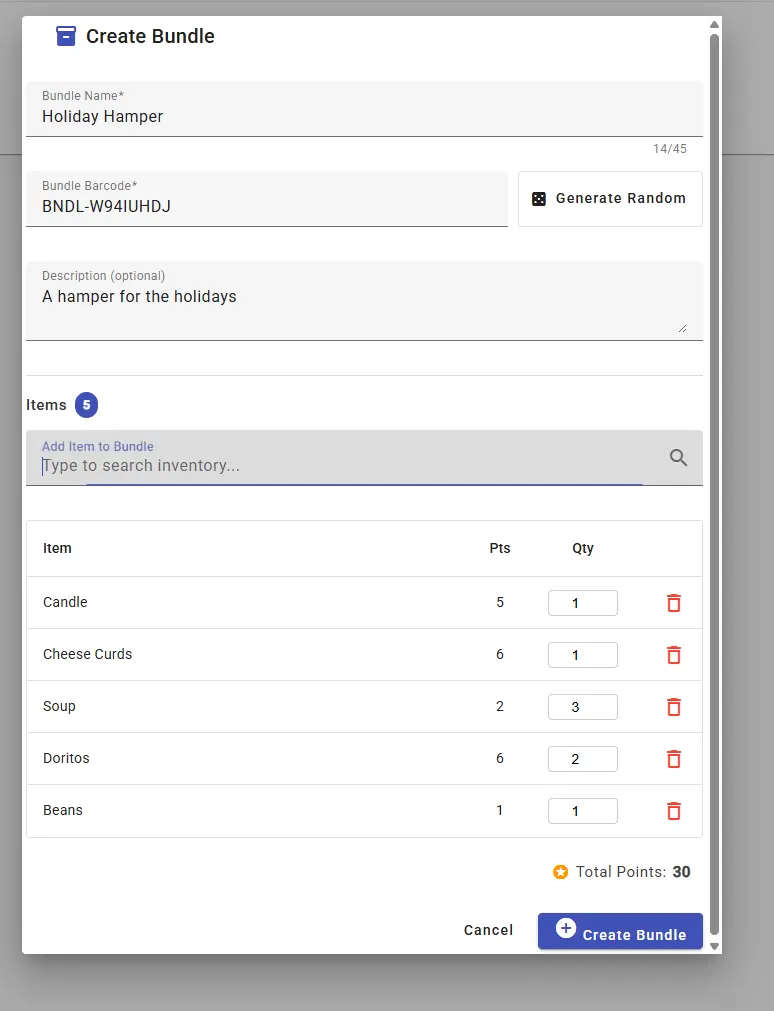
Building a "Holiday Hamper" in the Bundle Manager, with live point totals as items are added.
Inventory Dashboard & Audit Log
The inventory system has evolved into a full management platform. A new dedicated dashboard highlights everything that matters, and every quantity change is now fully traceable.
- KPI Summary Cards: Total tracked items, current low-stock items, and items nearing expiration, all on one screen.
- Low Stock Table: Every item below its custom reorder threshold is flagged automatically, so nothing quietly runs out.
- Waste Diversion Chart: Track how much food was redirected out of the building over time, which is useful for grant reporting.
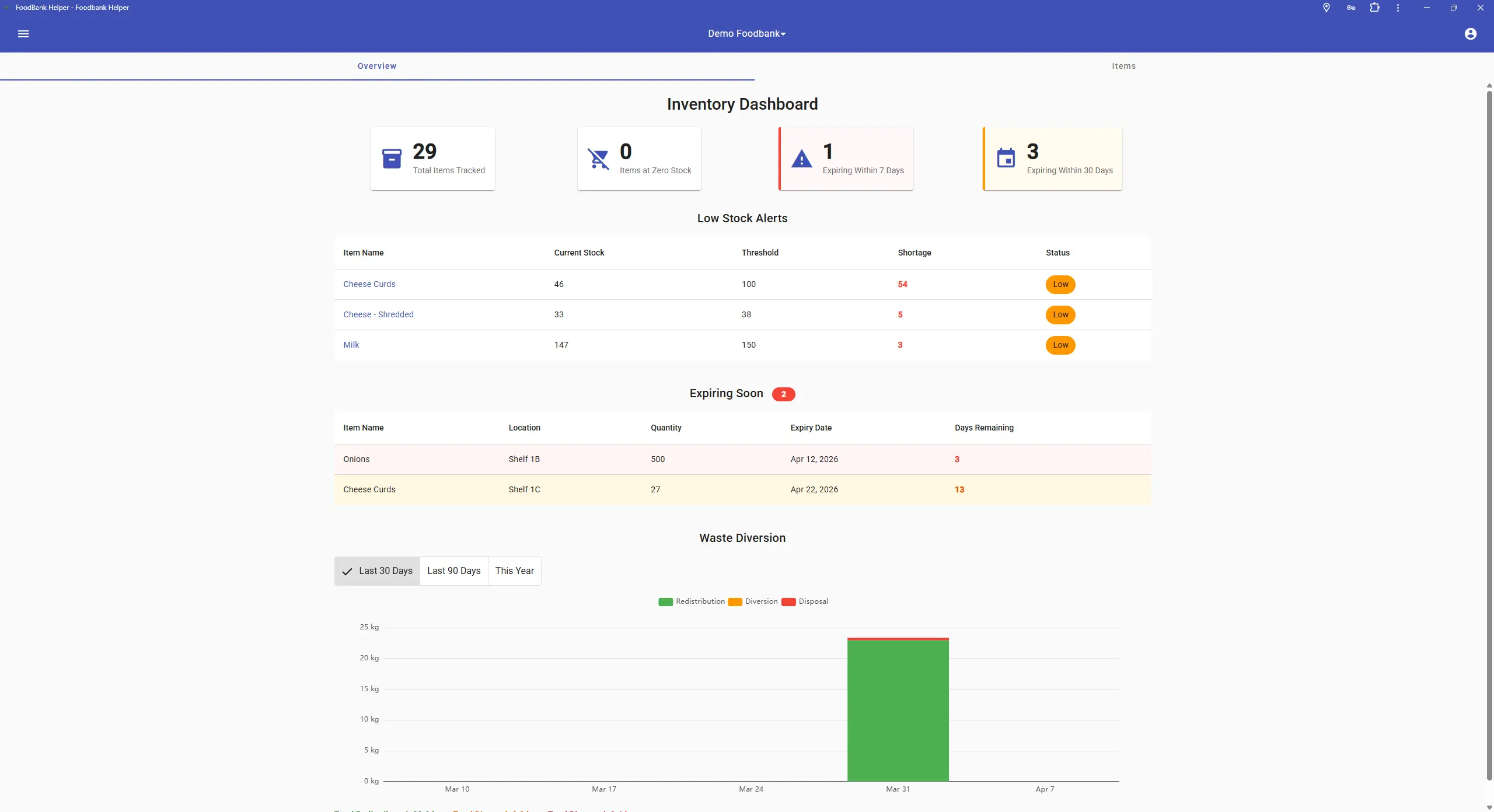
The Inventory Dashboard collects KPI cards, low stock alerts, expiring items, and waste diversion in one place.
Full Transaction Audit Log
Every change to inventory quantities is now fully traceable. The audit log inside Inventory Management shows a chronological record of every transaction: scans, transfers, donations, and orders. When a transaction was caused by a client order, the log entry links directly to that order.
- Barcode Scanning: Use your scanner during Donation Intake and Physical Stock Counts to quickly look up and log items, with no manual typing.
- Per-Line-Item Weights: Each donation line item can now carry its own weight figure for more granular reporting data.
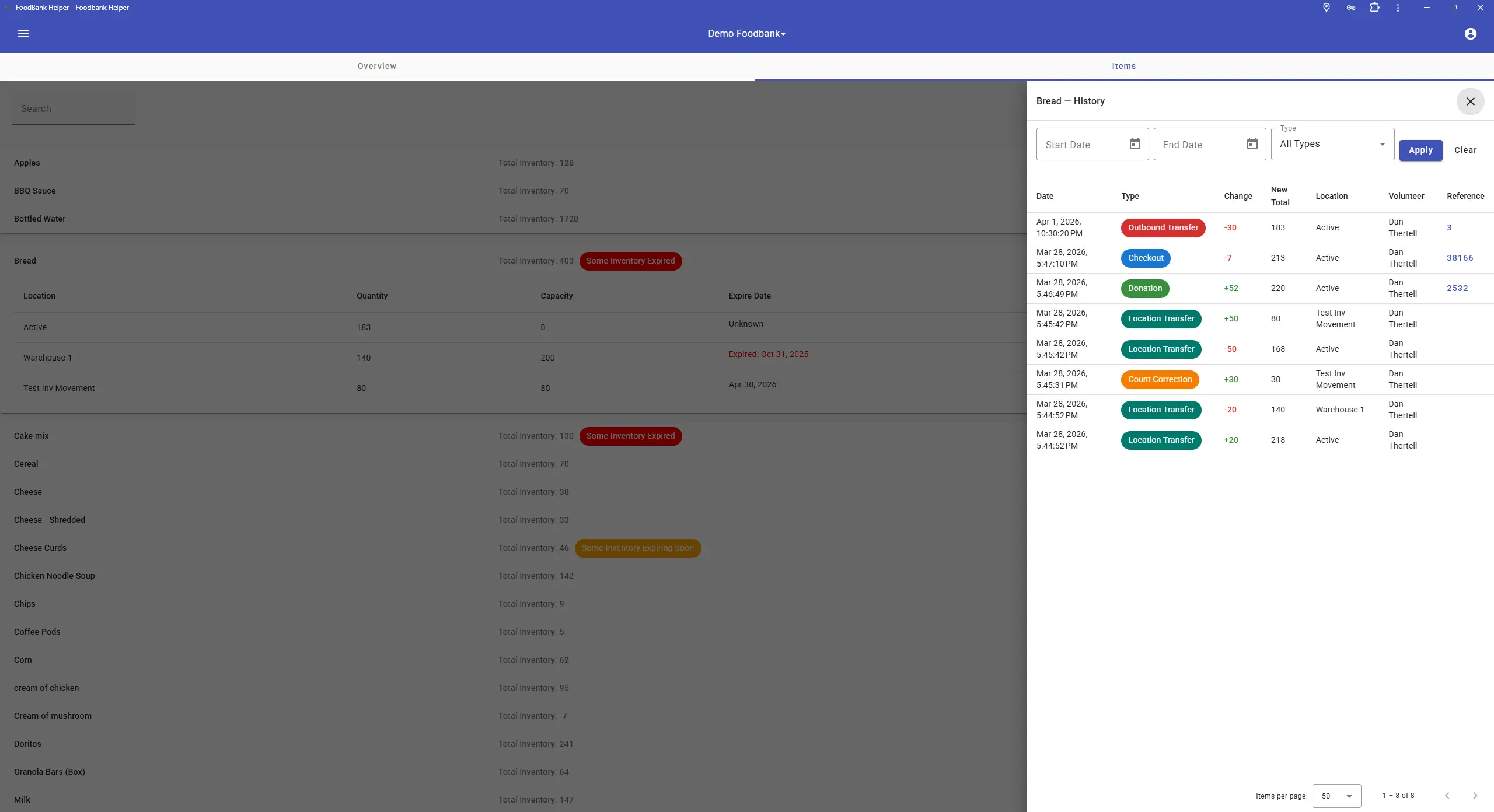
Every transaction is recorded with its type, quantity change, and a direct link to the originating order.
Wireless Scale Integration
Foodbank Helper now supports connecting a physical weight scale directly to your donation workflow. Our custom hardware hub sits next to your scale and pushes live weight readings to any tablet or computer on your network.
- Hardware installs once and connects to your scale via USB or serial port.
- Weight fields auto-populate in real time as items are placed on the scale, no manual entry required.
- No computer needs to be physically beside the scale, keeping your intake area clean and flexible.
Scale support is growing. Contact us to check if your model is supported or to request an integration. We'll work with you directly.
Outbound Transfers & Waste Diversion
A brand-new module for recording food that leaves your building without going to a client, whether to partner agencies, composting programs, or food rescue organizations.
- Define named Outbound Destinations (partner agencies, composting, rescue programs, or anyone you regularly transfer surplus food to).
- Record transfers by item and quantity. Includes an extra weight field for bulk items like liquids or packaging that don't map to item counts.
- All transfer data integrates with the Advanced Reports builder, with new components for food-flow breakdowns and outbound diversion rate metrics.
Checkout & Volunteer Workflows
The volunteer checkout experience was completely rethought for speed, clarity, and bundle support.
The New Cart Experience (Cart V2)
The volunteer-facing checkout cart received a full visual redesign, built specifically for busy checkout environments. It's cleaner, faster to navigate, and better suited to high-volume days.
- Bundle Support: Scanning or selecting bundles is only available in Cart V2.
- Clearer Limit Warnings: Volunteers immediately know when a client approaches or exceeds an item or group limit.
- Live Point Balance: The client's running balance is always visible throughout the checkout process.
Cart V2 is available now alongside the original cart and will gradually become the default for all users.
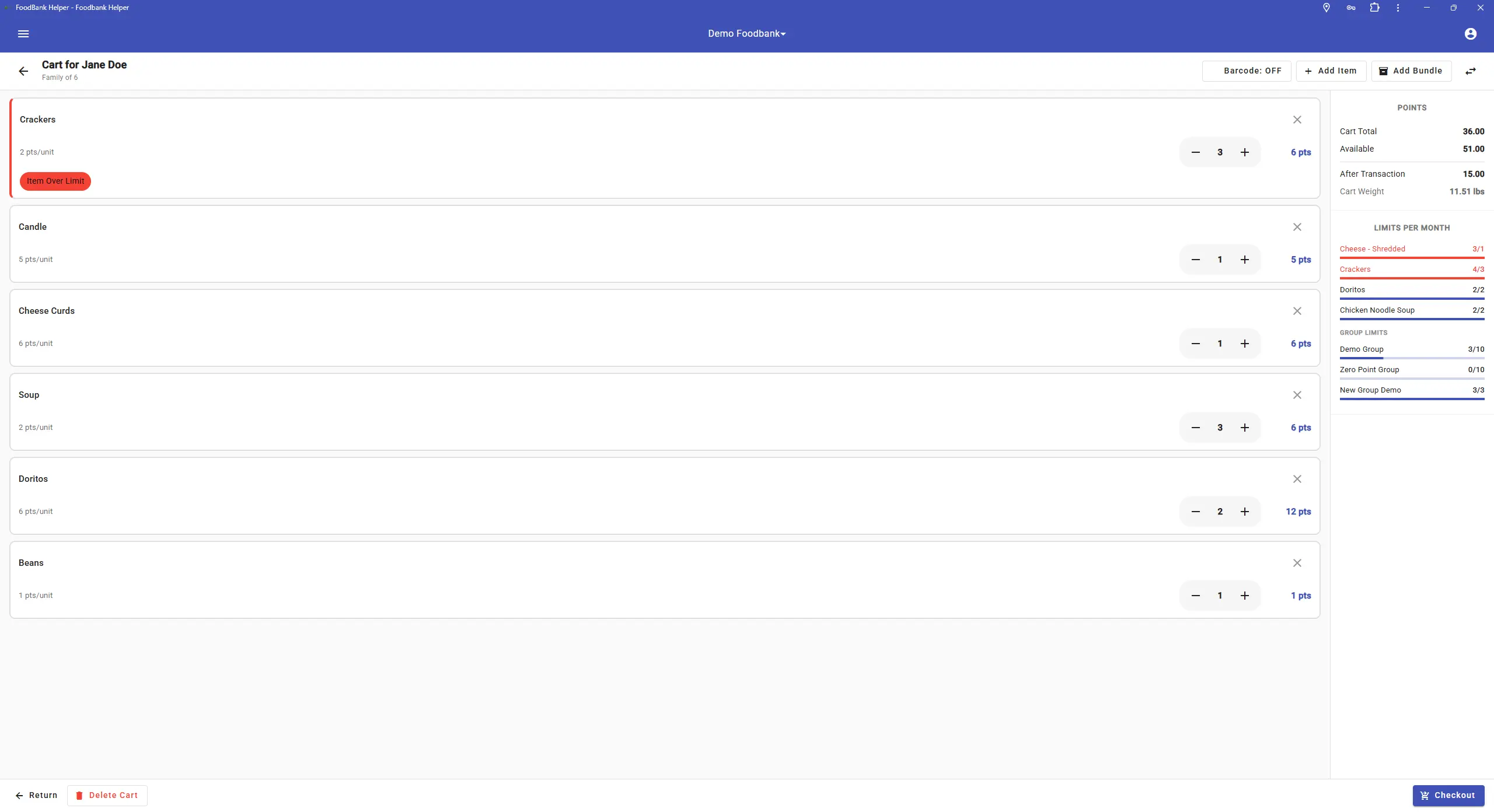
Cart V2's cleaner layout, live point balance, and prominent limit warnings keep volunteers in control.
One-Click Reorder
Staff can now recreate a past client order in seconds, which is great for packing lists, standard fulfillment, and recurring orders.
- Click Reorder on any past order in a client's history to pre-populate a new cart with the same items and quantities.
- Reorder carts appear on packing list screens so staff can prepare them; clients cannot self-checkout from these carts.
- Carts display clear Repeat and Staff Reorder labels so volunteers always know the origin of the order.
- Controlled by a new Reorder Previous Order permission, so you can scope this to the right staff roles.
Data, Analytics & Reporting
From a ground-up report builder to entirely rebuilt charts, it has never been easier to get at your data and put it to work.
Advanced Reports V2: Custom Builder
A ground-up rebuild of our reporting system. You're no longer limited to pre-built reports; build exactly what you need on a drag-and-drop canvas.
Drag & Drop Canvas
Choose from a palette of charts, KPI cards, and data tables. Drag components onto the canvas and arrange them freely.
No-Code Configuration
Set filters, time ranges, and groupings through a clean config panel, no code or SQL required.
Automated Scheduling
Set reports to run daily, weekly, or monthly. Results are saved in a run history so past outputs are always available.
PDF Export
Polished, grant-ready exports that faithfully reproduce your full report layout including all charts and KPI cards.
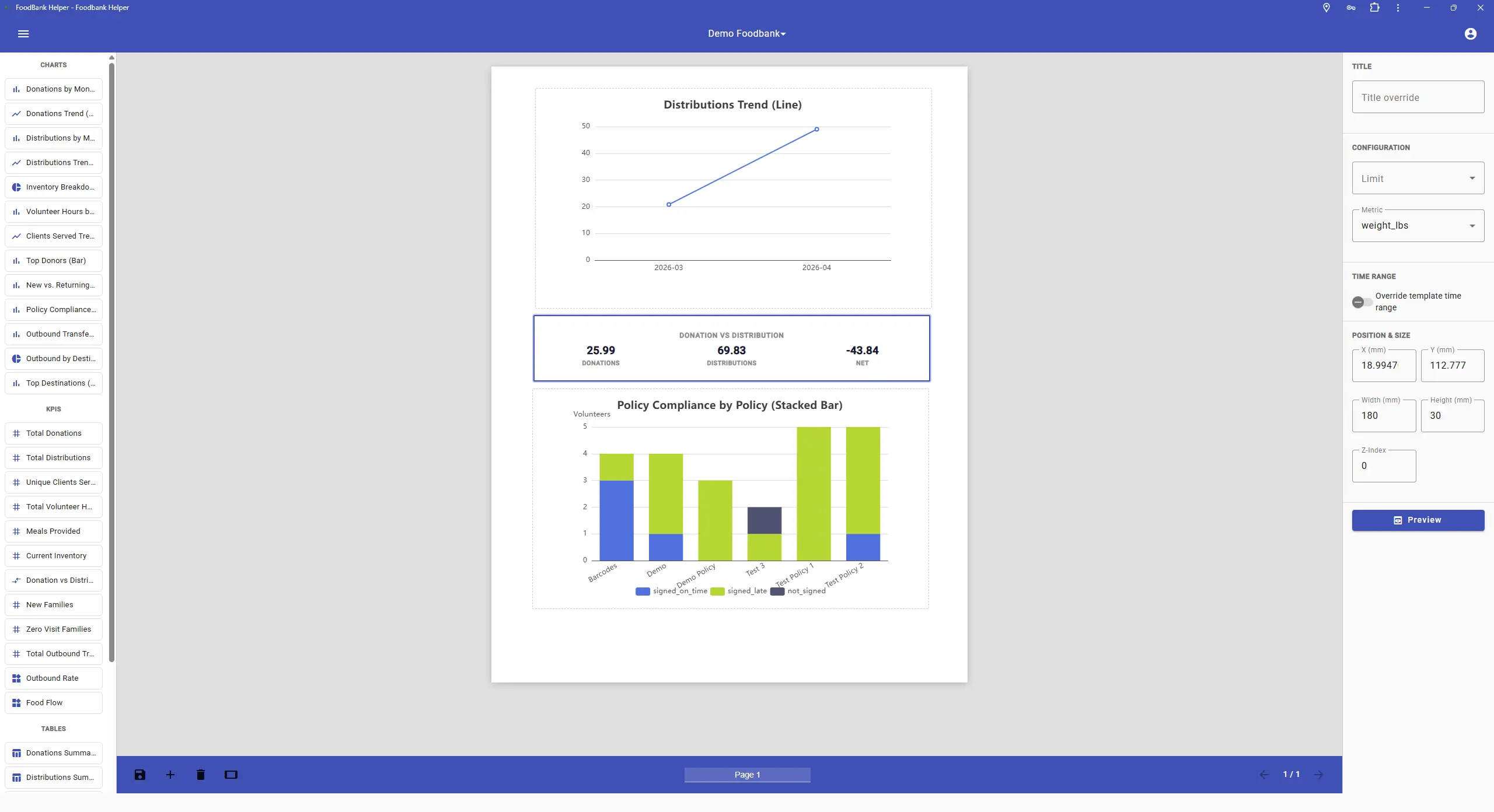
Drag components from the palette on the left, configure them in the panel on the right, and preview instantly on the canvas.
Major Statistics Overhaul
The Stats section received its biggest update ever: entirely rebuilt charts, new tracking views, and new data your team has been asking for.
- Interactive Charts Rebuilt: Every chart is smoother, faster, and responsive across all screen sizes. Hover over any data point for precise values.
- Weight Distribution: New views track how much food (by weight) leaves your facility over time: daily, monthly, and long-term trends.
- Meals Equivalent Tracking: Configure a "pounds per meal" value once (e.g. 1.2 lbs = 1 meal) and the system automatically translates distributed weight into estimated meals provided.
- Volunteer Stats Page: Trend charts of total volunteer hours, top volunteer rankings, and a monthly new-vs-returning breakdown.
- Family & Item KPIs: Summary cards showing total families served, families approaching limits, and families who have exceeded their limits.
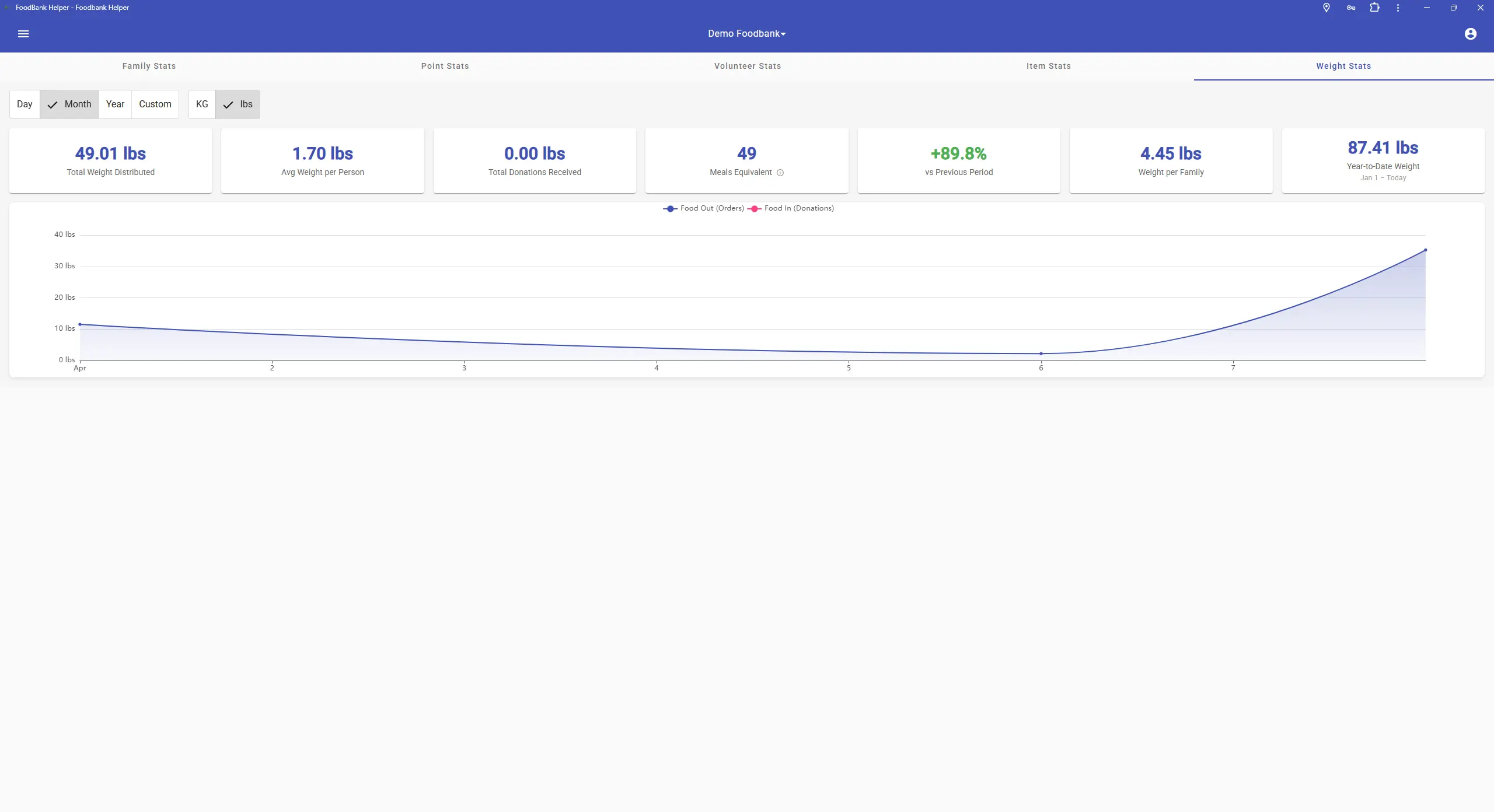
The new Weight Stats KPI row includes Meals Equivalent, alongside a rebuilt trend chart comparing food distributed against donations received.
Communication & Scheduling
Catch problems before they happen, and keep your scheduling under control.
Native Push Notifications & Alert Subscriptions
Foodbank Helper now sends real-time alerts directly to phones, tablets, and desktops, even when the browser isn't open. Staff subscribe to exactly the alerts they need.
- Low Stock Alerts: Get notified the moment an item drops below its reorder threshold.
- Unfilled Shift Digest: A scheduled check identifies upcoming shifts without enough volunteers and notifies coordinators in advance.
- Real-Time Shift Alerts: Instant notifications when volunteers sign up for or cancel a shift.
- Smart Kiosk Detection: Shared checkout and lobby devices are automatically excluded from push notification registration, so staff alerts stay with staff.
- Personal Preferences: Each volunteer manages their own notification categories. A nav badge prompts users who haven't set theirs yet.
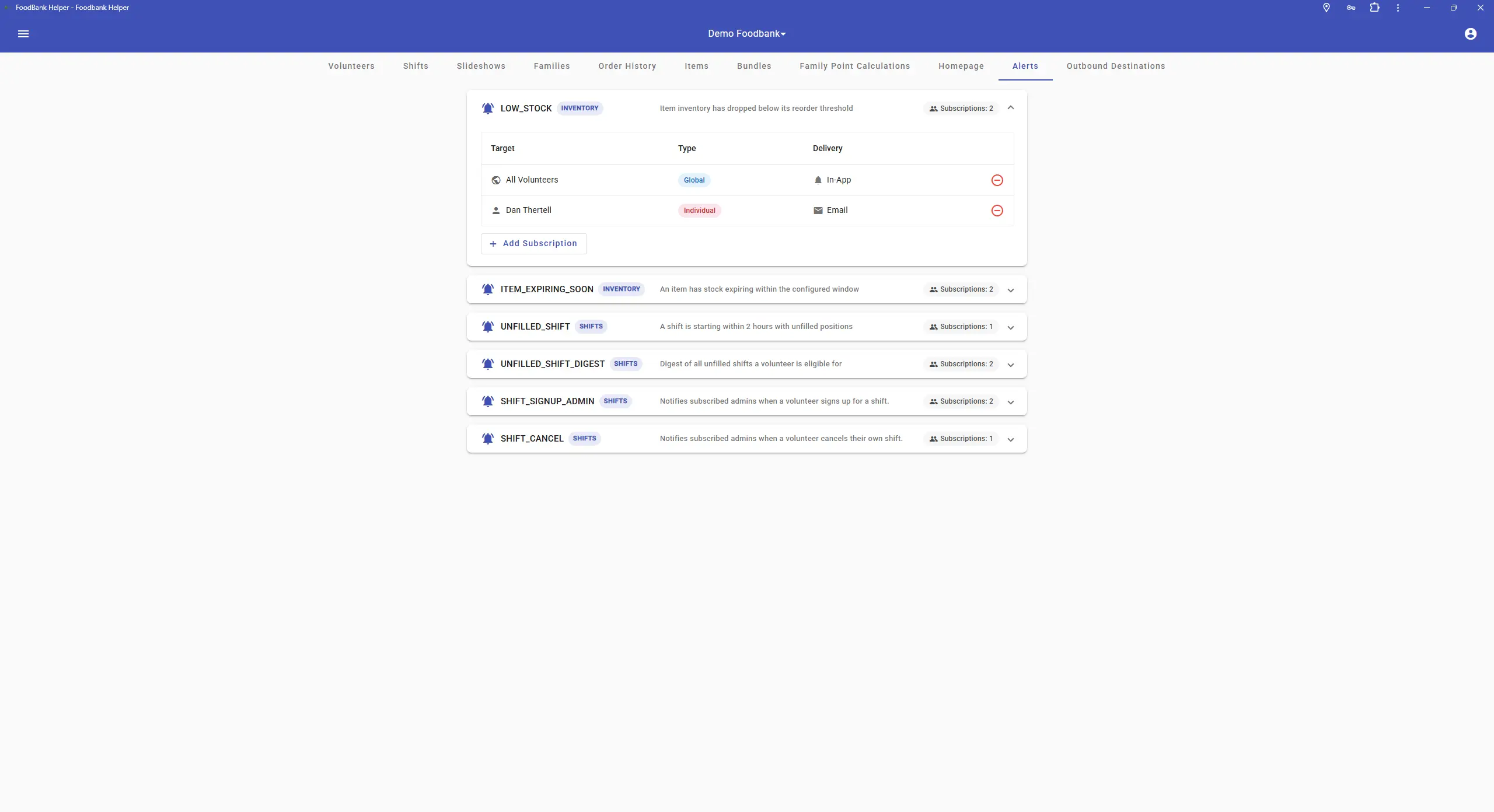
Configure subscriptions per alert type, sent by in-app notification or email.
Shift Management Improvements
The volunteer shift management tools in the admin panel received significant updates, making scheduling faster and catching problems earlier.
- Redesigned Calendar: See which volunteers are signed up for each shift directly from the calendar, with no extra clicks to open each shift.
- Overlap Prevention: The system now blocks volunteers from being signed up for two shifts that overlap in time, with a clear conflict message.
- Capacity Alerts: Clear warnings when a shift has more volunteers than its capacity allows.
- Smarter Repeat Editing: When editing a repeating shift, choose whether your changes apply to just this occurrence or all future instances.
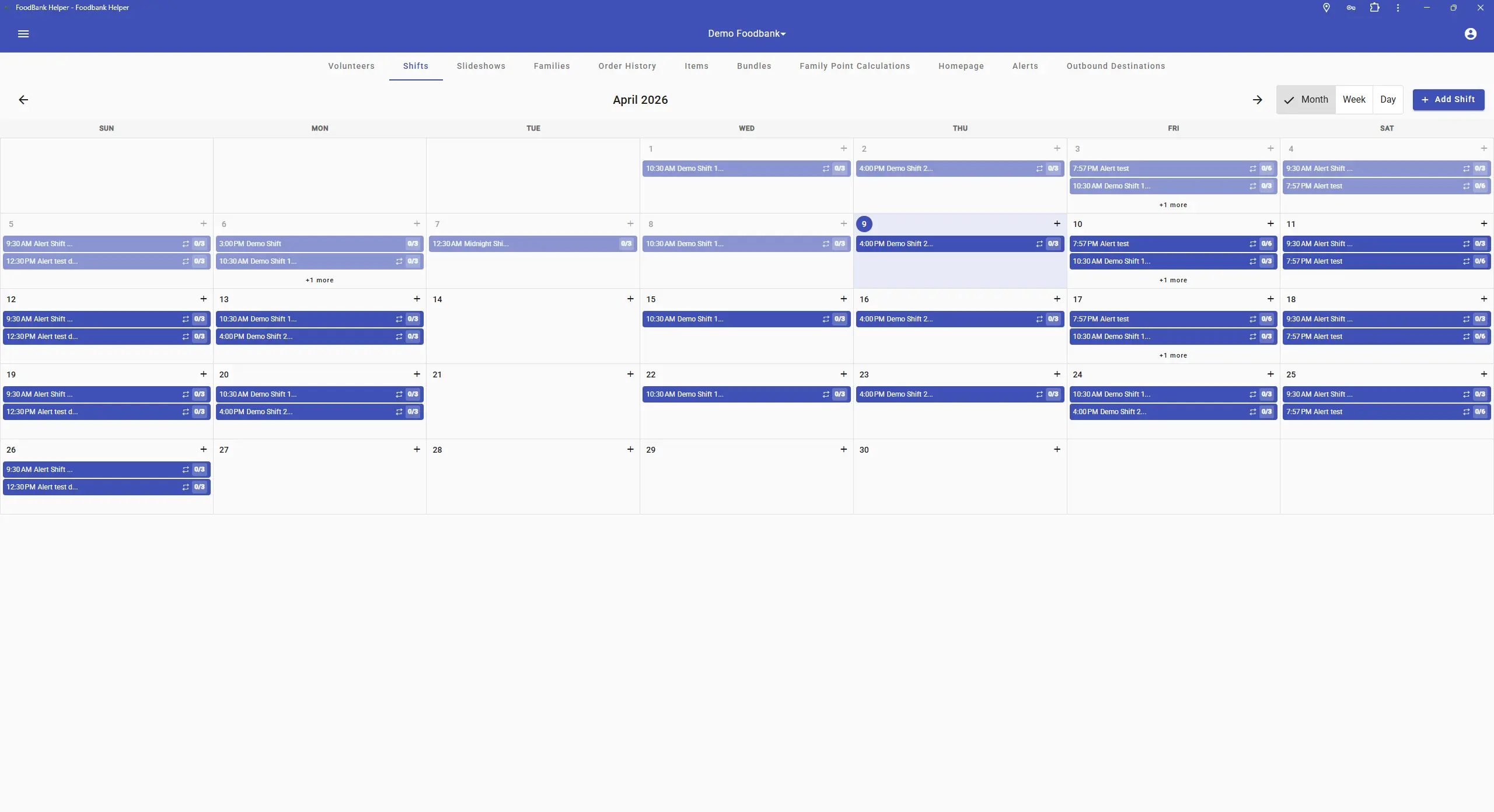
The redesigned shift calendar shows volunteer names per shift without opening each one, with capacity and overflow easy to spot.
Interface & General Improvements
A wide sweep of visual improvements and quality-of-life fixes make Foodbank Helper look and feel more polished throughout.
Modernized Interface
Volunteer Homepage
Redesigned with a clean, card-based layout. Key information is easier to find, and the overall feel is more modern and welcoming.
Admin Homepage Editor
Cleaner interface that gives admins a much better sense of what they're editing as they work: logo, mission, hours, and news items.
Drag-and-Drop Slideshow
Drop files directly onto the upload area rather than using a file picker dialog. The overall panel is easier to navigate.
Donation Recording
Back-date donations, lock-in donor or type for bulk entry, and alphabetical sorting on all dropdown lists. Real time-savers during busy intake.
Mobile Responsiveness
Across-the-board improvements for tablets and phones across the cart, donations, and reporting modules.
KG / LBS Preference
Each volunteer can set their preferred unit of weight. The system always displays weights in the unit they're most comfortable with.
Framework & Reliability Updates
The underlying application framework and several supporting libraries were updated to their latest versions, bringing performance improvements and keeping Foodbank Helper on a solid long-term foundation. Various reliability fixes were also shipped across the cart, shift scheduling, statistics, and donations modules.
Ready to explore these features?
All Q1 2026 features are live and available to every Foodbank Helper account at no extra cost.